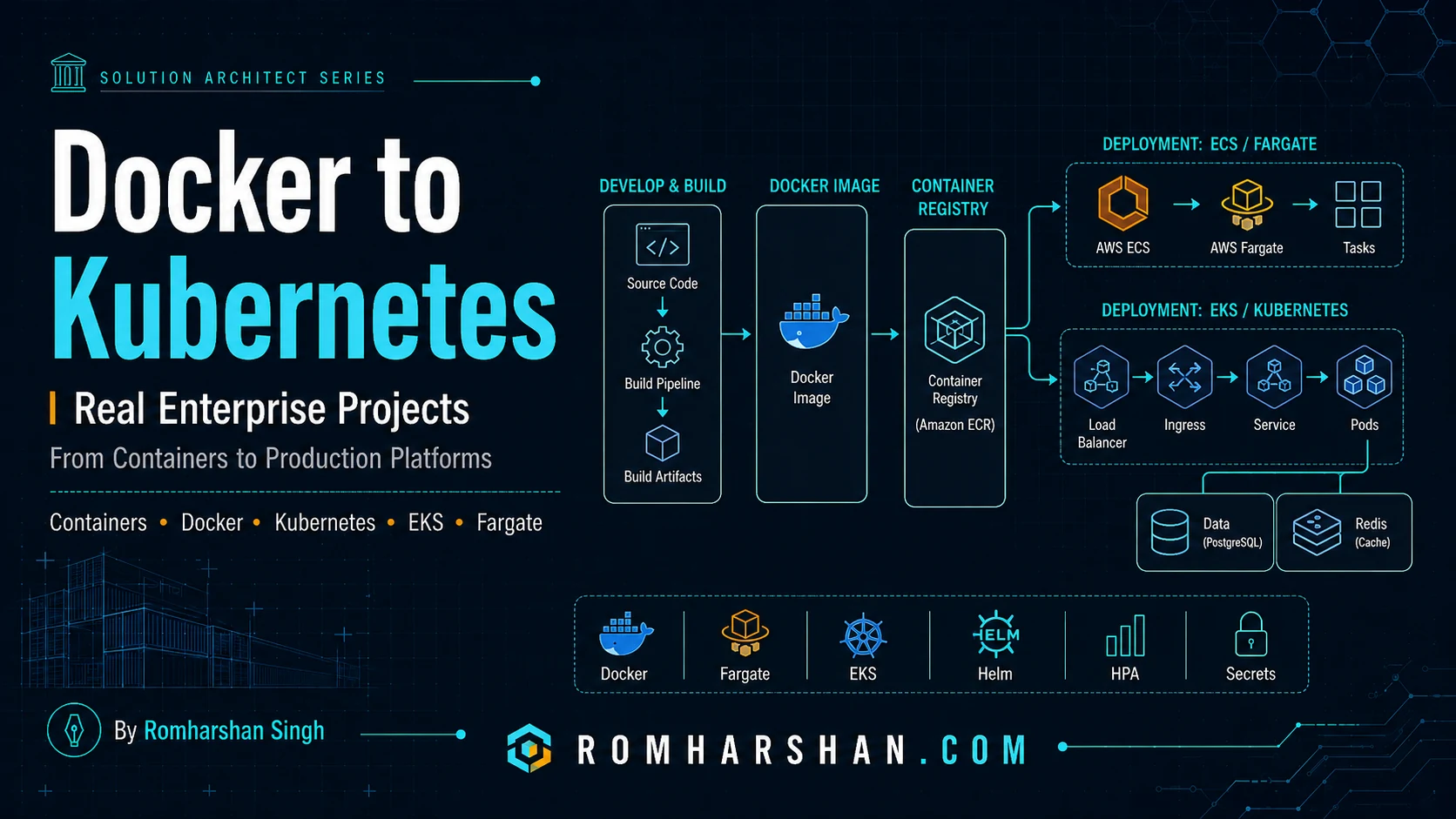
Docker to Kubernetes: How I Have Containerized and Deployed Enterprise Applications in Real Projects
Why containerization changed deployment for me
Before containers, production deployment often depended on server history:
which Java version?
which Node version?
who installed this library?
is this config file the same as UAT?
why does one server behave differently?
Containerization changed the unit of deployment.
I can build:
application
runtime
required libraries
startup command
into one immutable image and promote it.
But Docker is only the first layer.
Production still needs:
registry
network
secrets
configuration
scheduling
health
scaling
load balancing
logs
metrics
deployment strategy
That is where ECS/Fargate, Kubernetes/EKS and related platform tooling enter.
1. Production Docker images
My Docker principles:
- multi-stage build;
- deterministic dependencies;
- small runtime layer;
- non-root process;
- no secrets;
- immutable tags/digests;
- vulnerability scanning;
- graceful shutdown;
- structured stdout logs.
Deep dive:
2. ECS/Fargate
Not every team needs Kubernetes.
Fargate can be a strong choice when:
we want containers
we want autoscaling
we want AWS networking/IAM
we do not want to manage worker nodes
we do not need Kubernetes APIs/operators
Deep dive:
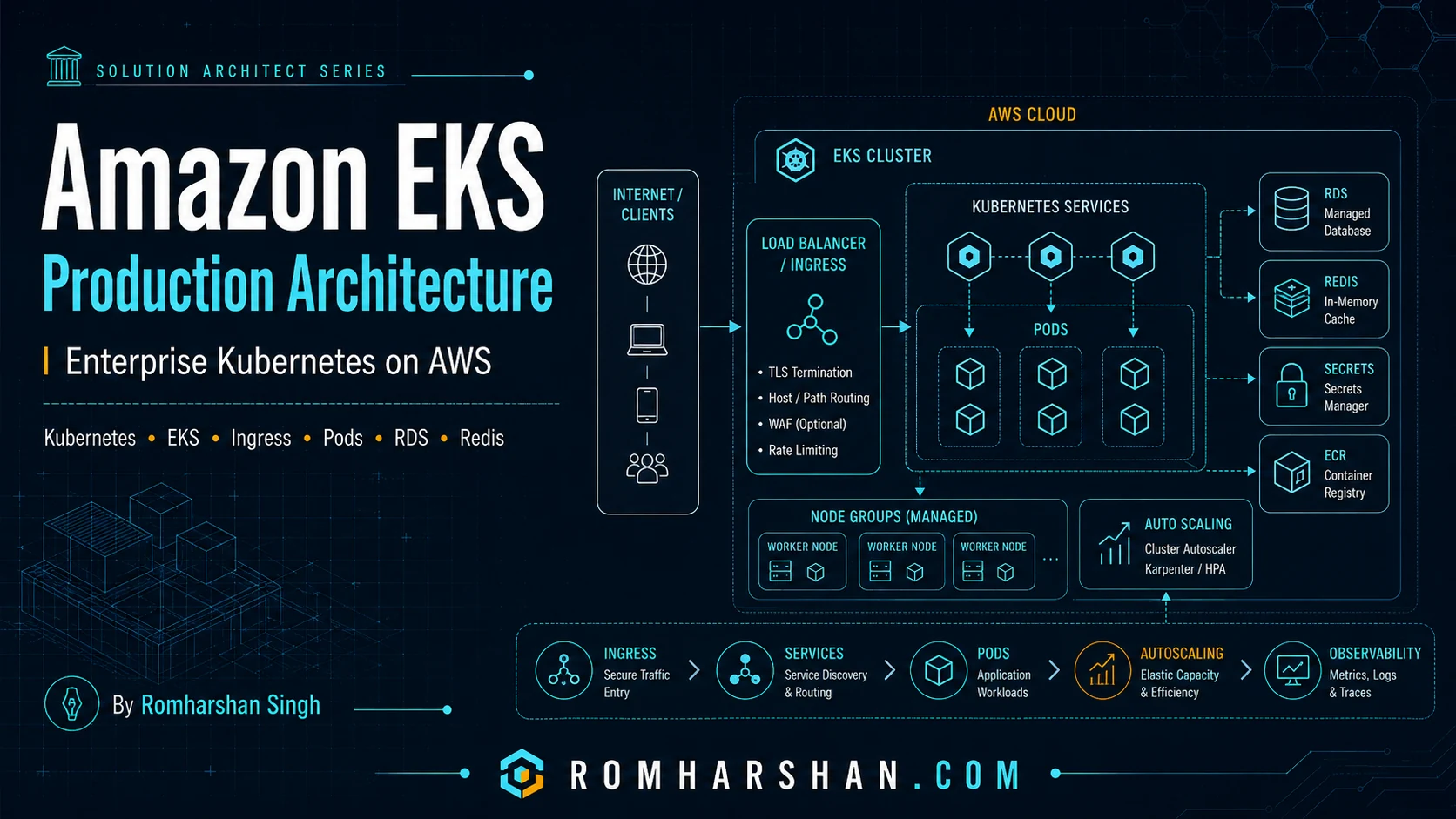
3. EKS / Kubernetes
I use Kubernetes when the platform benefits from:
standard workload API
service discovery
portable deployment model
controllers/operators
Helm ecosystem
advanced scheduling
shared platform conventions
EKS removes control-plane administration but does not remove workload architecture.
Deep dive:
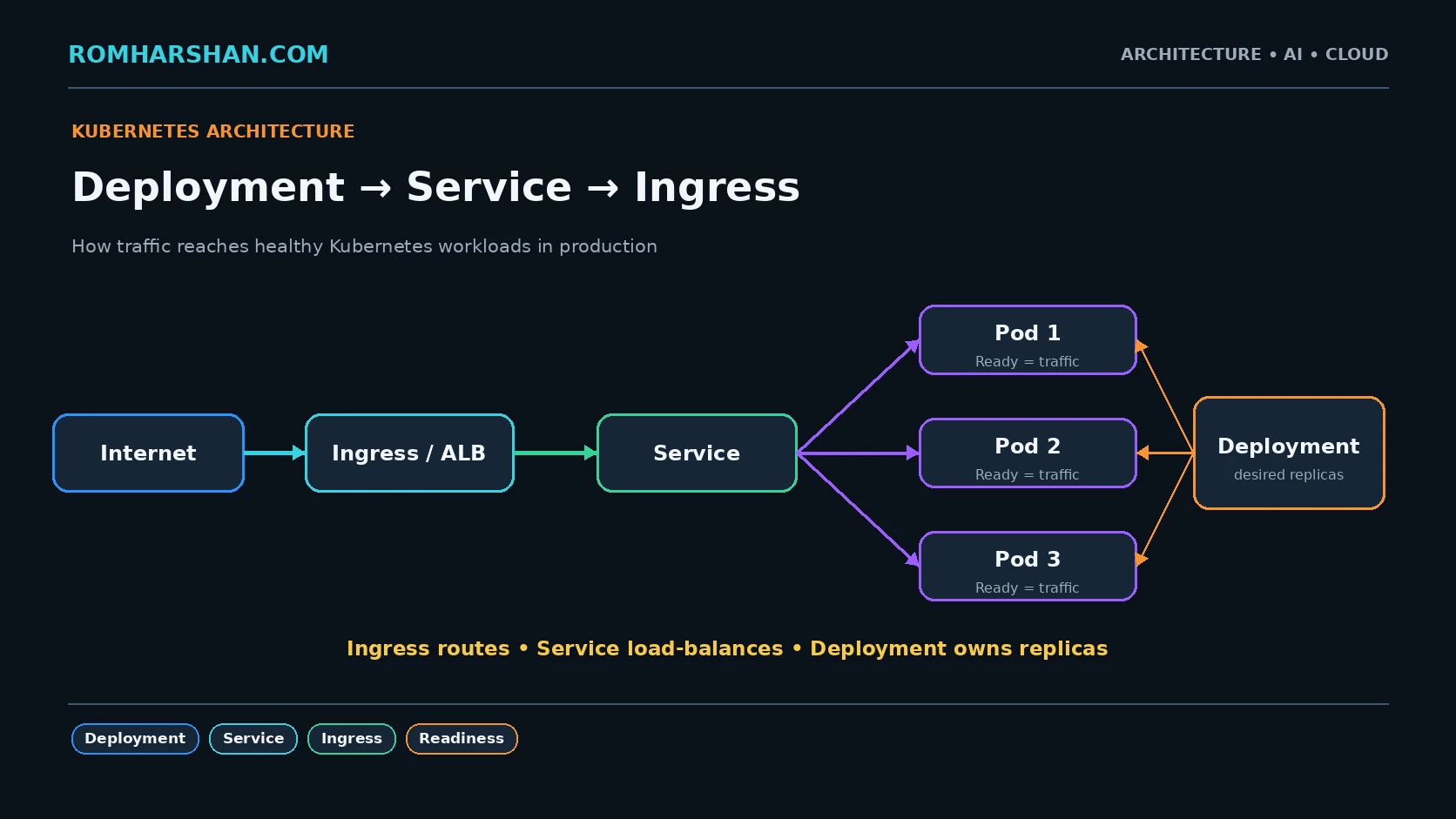
4. Deployment, Service and Ingress
These three objects explain much of the normal request path:
Load Balancer
   |
Ingress
   |
Service
   |
ready Pods
   |
application
Deep dive:
5. ConfigMap
I keep non-sensitive environment values outside the image.
data:
  PAYMENT_TIMEOUT_MS: "2500"
  FEATURE_X: "false"
Same image:
DEV
QA
UAT
PROD
Different controlled configuration.
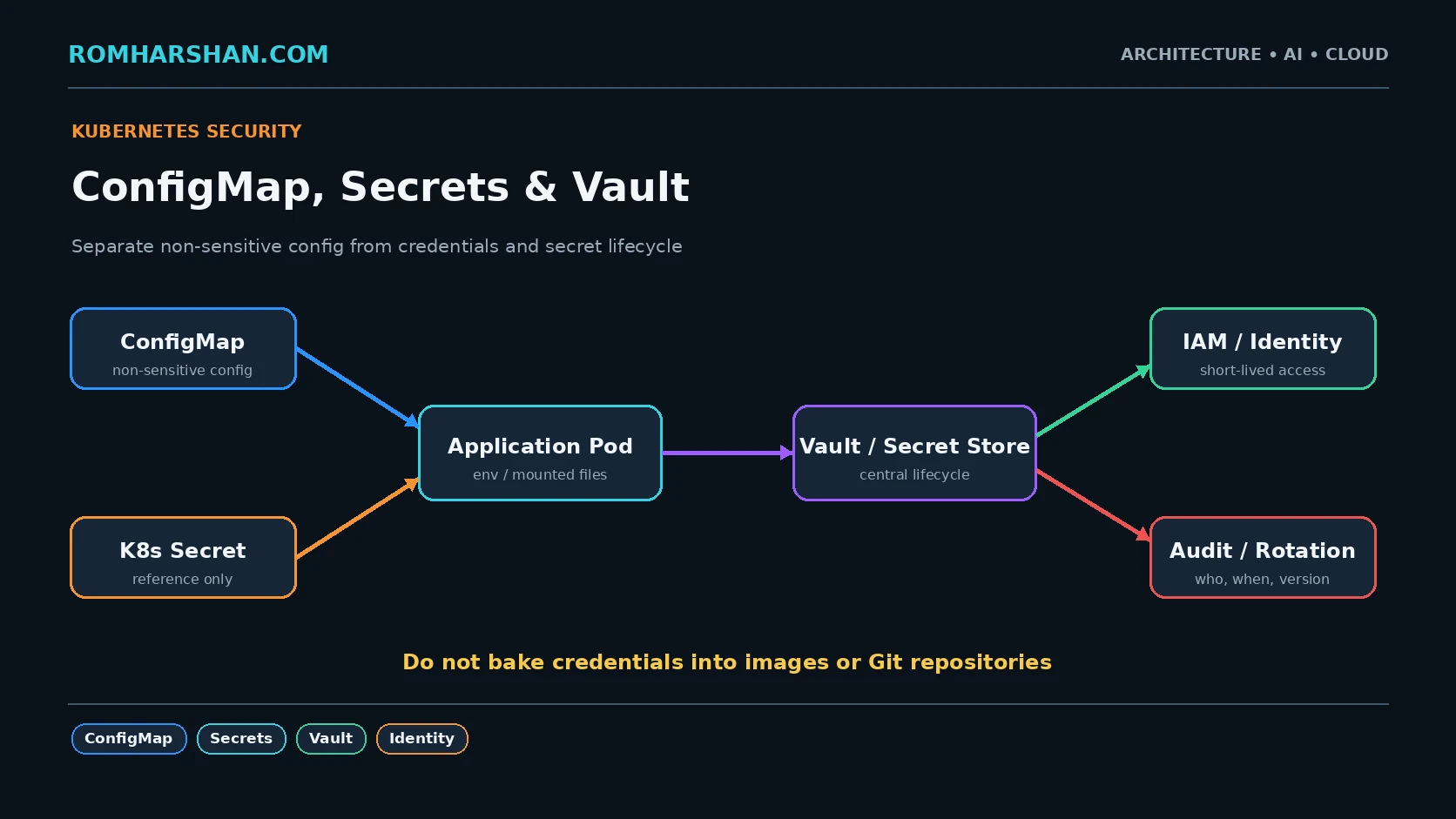
6. Secrets and Vault
Passwords/tokens/keys are not ConfigMap data.
I use:
Kubernetes Secrets with encryption/RBAC
Vault
AWS Secrets Manager
Azure Key Vault
depending on the platform.
Deep dive:
7. Helm
Helm helps package repeatable Kubernetes deployment:
Chart.yaml
values.yaml
values-prod.yaml
templates/deployment.yaml
templates/service.yaml
templates/hpa.yaml
I avoid copying entire YAML directories per environment.
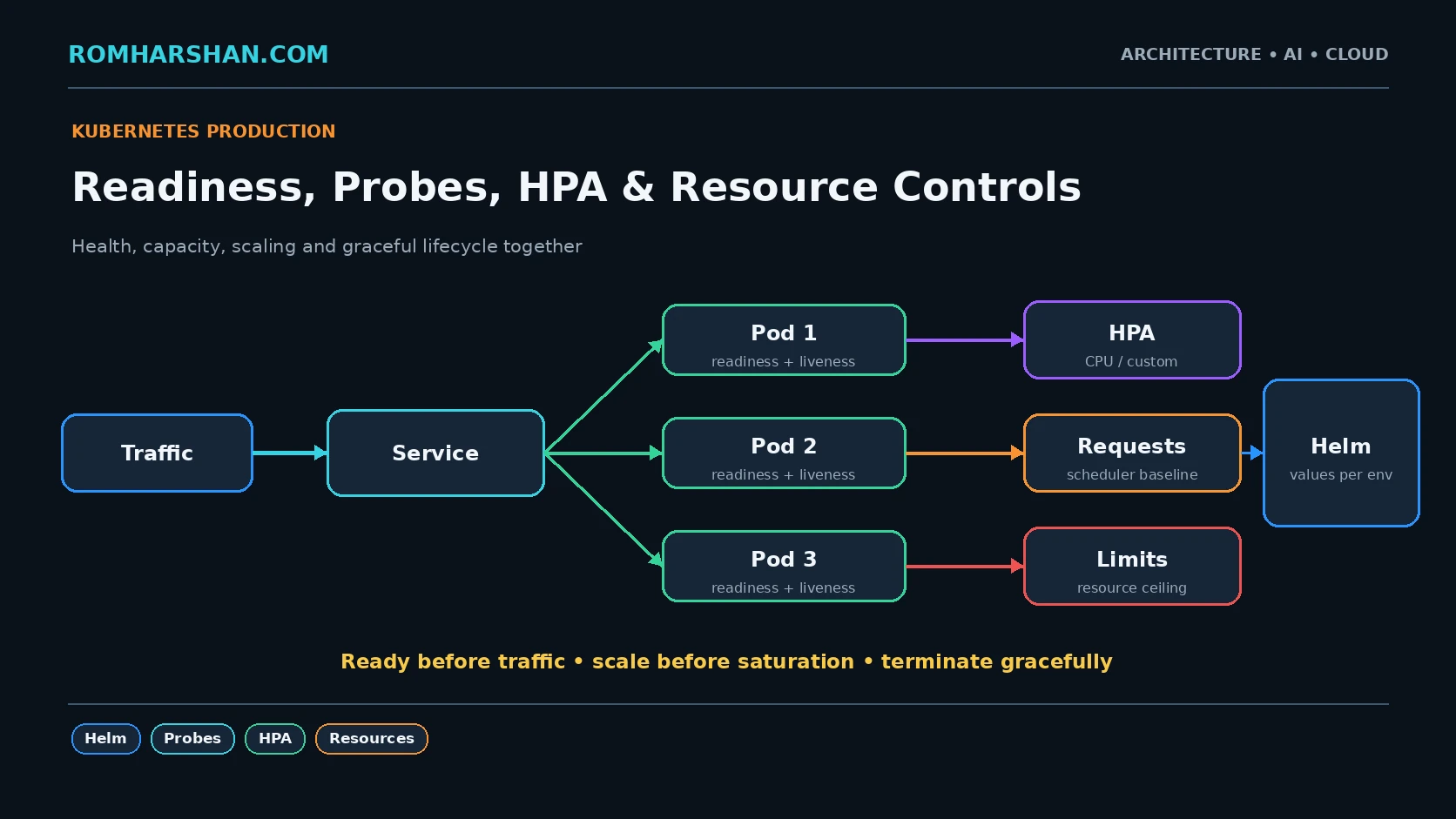
8. Startup, readiness and liveness
These are different:
startup:
has initialization completed?

readiness:
should traffic reach me?

liveness:
is process stuck enough to restart?
A payment-provider outage should not normally make liveness restart every booking pod.
9. Resources
Kubernetes scheduler needs realistic requests.
resources:
  requests:
    cpu: 250m
    memory: 256Mi
  limits:
    cpu: "1"
    memory: 768Mi
I compare request vs real usage.
Over-requesting wastes nodes.
Under-requesting creates contention and poor scheduling.
10. Horizontal Pod Autoscaler
HPA can scale API pods.
But if the database is fixed at 100 connections, scaling from 5 to 50 pods can increase pressure.
Autoscaling must work with:
DB connection limits
bulkhead
backpressure
external provider quota
cluster capacity
Deep dive:
11. Graceful termination
Kubernetes replacement:
SIGTERM
stop new traffic
finish bounded in-flight work
stop Kafka consumption
close DB
exit
If the process ignores this, rolling deployments can drop real transactions.
12. Pod disruption and topology
For critical services I consider:
multiple replicas
PodDisruptionBudget
zone spread
anti-affinity
node capacity
Running four replicas on one node is not high availability.
13. Container security
I prefer:
non-root UID
read-only FS where possible
drop capabilities
least-privilege service account
network policy
secret manager
image scan
signed/controlled artifact
The container image is part of the software supply chain.
14. Observability
Platform:
pod restart
OOMKilled
CPU throttling
pending pods
node pressure
HPA desired/current
ingress errors
Application:
business success
API latency
Kafka lag
DB pool
external provider errors
I need both.
15. Choosing between Fargate and Kubernetes
I ask:
How many services?
Does team already operate Kubernetes?
Do we need operators/custom scheduling?
Is portability important?
What is utilization shape?
What platform skills exist?
What is operational cost?
A simpler platform is often the better architecture.
All container/Kubernetes deep dives
- Production Docker Multi-Stage Builds
- AWS ECS Fargate in Production
- Amazon EKS Production Architecture
- Kubernetes Deployment, Service and Ingress
- Kubernetes ConfigMap, Secrets and Vault
- Kubernetes Production Readiness: Helm, Probes, HPA
My production container checklist
- Multi-stage image.
- Non-root runtime.
- No secrets in image.
- Image scan.
- Immutable version.
- Configuration externalized.
- Secrets through controlled identity.
- Readiness/startup/liveness correct.
- Resource requests/limits measured.
- Graceful shutdown.
- Multiple replicas.
- Service discovery.
- Controlled ingress.
- Autoscaling linked to real bottleneck.
- DB/downstream protected from scale-out.
- Logs/metrics/traces.
- Deployment strategy.
- Node/zone failure considered.
- Upgrade lifecycle planned.
- Cost reviewed.
Architect's final take
Docker solves packaging.
Kubernetes solves scheduling and orchestration.
Neither automatically solves application reliability.
A containerized service with no timeout, no idempotency and an overloaded database still fails—it simply fails inside a pod.
I treat container/platform design and application architecture as two layers that must agree on:
health
capacity
shutdown
identity
configuration
failure
observability
deployment
That is when containerization becomes a production capability rather than only a deployment format.
Your feedback helps prioritize deeper technical content.

Romharshan Singh
Senior Solution Architect and Full Stack Technology Leader with 20+ years of enterprise engineering experience across AI, cloud, distributed systems, Java, Node.js, React, Angular, Kafka and Kubernetes.